

Welcome to the 360 Federal Credit Union Family!
We are so happy you’re banking with us.
This page brings together the key details about our products and services, giving you the tools you need to make the most of your membership.
For Branch Locations & Hours, click here.
Bank in person AND online! To sign up for online banking, click here. Once enrolled, you can download the 360FCU Mobile App from the App Store on your smart device. By banking online, enjoy special features like remote check deposit, managing card controls, instant balances, and more. For more information, watch this video tutorial on Mobile Banking.
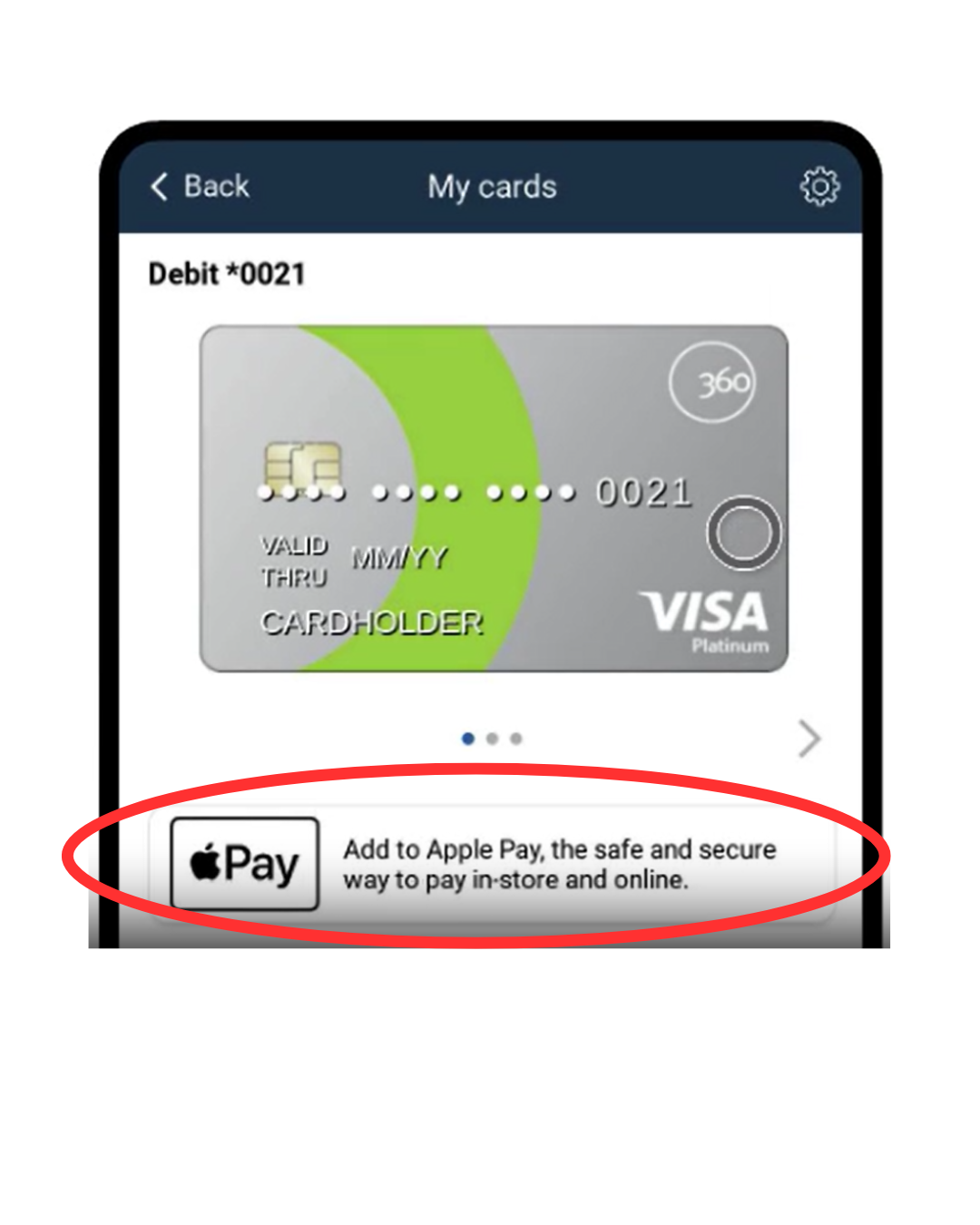
Did you know using your Mobile Wallet is safer than using your physical card? When using your digital wallet, your card information is encrypted and hidden from stores and online retailers. Adding your 360FCU debit/credit card to your mobile wallet is easy:
- Log into your 360FCU Mobile App
- Go to “My Cards”
- Below your card information, select “Add to Apply Pay®” (or Samsung Wallet™, Google Pay®, etc.)
- Confirm selection
That’s it! Now use your card from your smart device wherever you see the contactless payment symbol.
For a video tutorial on using your mobile wallet, click here.
At 360FCU, we offer a variety of Checking and Savings Accounts to suit all your needs.
All of our Checking Accounts include:
- Free Visa® Debit Card
- Mobile wallet for simple and secure payments using Apple Pay®, Google Pay™, and Samsung Pay®
- Overdraft Protection options
- eStatements
For more information on our Checking Accounts, click here.
Choose a Savings Account that fits your needs:
- Savings Account/Share Certificates
- Club Accounts (Holiday or Vacation)
- Special Purpose Account
- IRA Accumulator Account
For more information on our Savings Accounts, click here.
Here at 360FCU, there are multiple ways to access your banking 24/7:
- Online & Mobile Banking: Use Web24 and your 360FCU Mobile App to access your accounts.
- Mobile Wallet: Add your 360FCU debit or credit card to your mobile wallet on your smartphone, smartwatch, or tablet to shop securely and 100% contact-free.
- Interactive Teller Machine (ITM): Visit a branch anytime to use our ITM. Make deposits, make payments, transfer between accounts, & more!
- Bill Pay: Manage your bills with ease! Login to your Web24 account, go to your checking account, click Pay Bills, and add payees to schedule automatic payments.
- Zelle®: Fast, free, & easy way to send money digitally. Login to your Web24 account to get started.
For more information on our digital banking services, click here.
Curious about our current rates?
Follow us on social media to stay up to date with the latest branch updates, exclusive offers, & community happenings!
Welcome to the 360FCU Family!
Printable Version of the New Member Welcome Packet
Disclosures:
iPhone and iPad are trademarks of Apple Inc., registered in the U.S. and other countries. App Store is a service mark of Apple Inc.
Android, Google Play and the Google Play logo are trademarks of Google Inc.
Messaging and Data Rates May Apply. Check with your mobile carrier for details.
Zelle and the Zelle related marks are wholly owned by Early Warning Services, LLC and are used herein under license. Terms and conditions apply.
The lowest supported operating system versions to use our mobile apps on a phone or tablet are Apple iOS 13 and Android OS 8.