
Important Update: Credit Card Access Is Moving in Online Banking
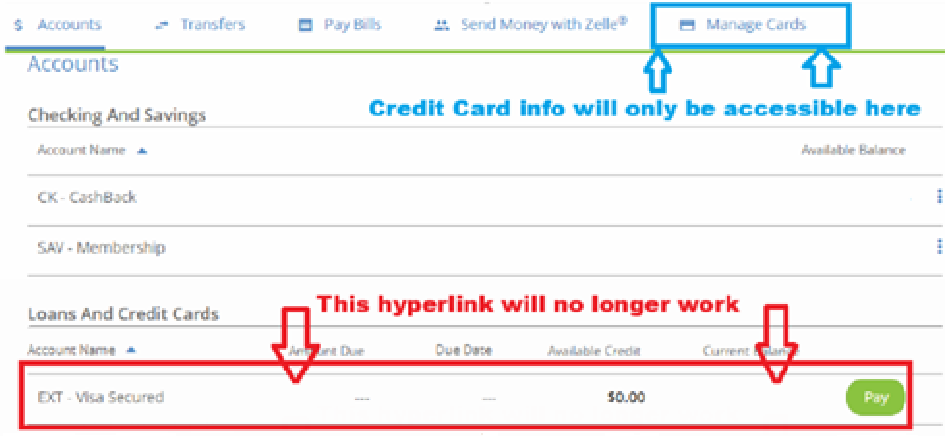
Beginning Sunday, October 5th, one of the Visa Credit Card links will no longer be available in Web24. Visa Credit Card information will be consolidated into one link within our online and mobile banking applications.
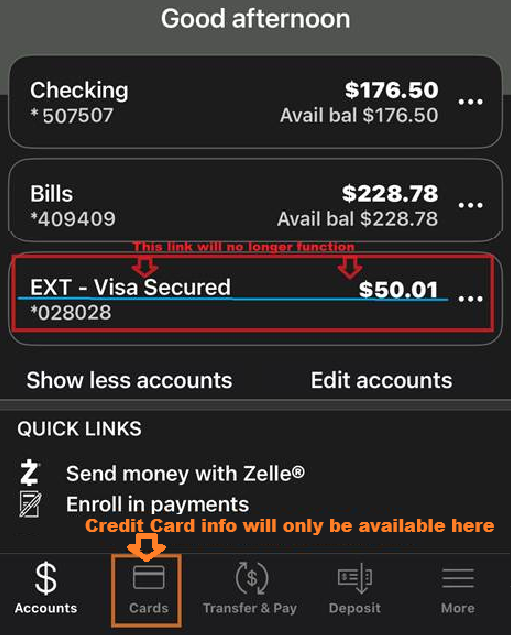
To continue managing your credit card, including viewing transactions, making payments, using card controls, and redeeming rewards, please use the Manage Cards link within Web24 online, or the Cards icon in the mobile app. This change is designed to streamline your experience and make it easier to access all your 360FCU card information in one place.
Mobile App Visual:
Web24 Online Visual:
What You Need to Do:
✅ Log in to Web24 or the Mobile app
✅ Navigate to the Manage Cards section at the top of the page or click on Cards in the mobile app
✅ View your credit card activity, make payments, download statements, set travel instructions, redeem rewards, and more, as usual
If you have any questions or need assistance, our team is here to help, 860.627.4200.